Configuration de Mkdocs
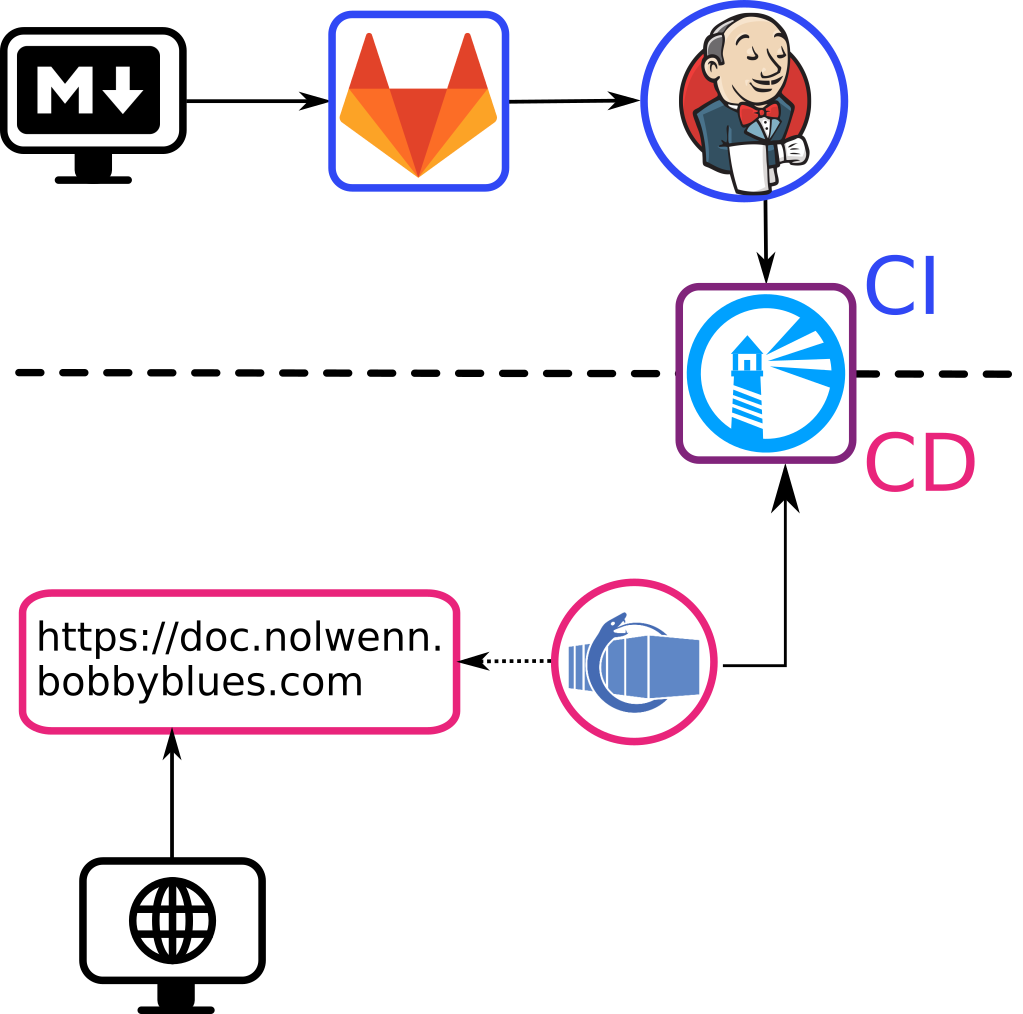
Résumé de la chaîne CI/CD
Fichier mkdocs.yml
# Site title
#site_name: DevOps

# All Menus and Items in it
nav:
    - Introduction: index.md
    - Organisationnel :
        - Ceph: orga-ceph.md
        - Certificats: orga-certificats.md
        - Documentation: orga-mkdocs.md
        - Kanboard: orga-kanboard.md
        - Présentation: orga-presentation.md
    - SCM:
        - Git: scm-git.md
        - Github: scm-github.md
        - Gitlab: scm-gitlab.md
        - Gogs: scm-gogs.md
    - CI:
        - Gitlab CI: ci-gitlabci.md
        - Jenkins: ci-jenkins.md
        - Drone: ci-drone.md
    - Conteneurs:
        - Docker: conteneurs-docker.md
        - Dépôts: conteneurs-depots.md
        - Docker Registry: conteneurs-dockerregistry.md
        - Harbor: conteneurs-harbor.md
        - Træfik: conteneurs-traefik.md
    - Monitoring:
        - Prometheus: monitoring-prometheus.md
        - Node Exporter: monitoring-nodeexporter.md
        - Grafana: monitoring-grafana.md
    - Déploiement:
        - Ouroboros: deploiement-ouroboros.md
        - WatchTower: deploiement-watchtower.md
        - DNS: deploiement-dns.md
        - Puppet: deploiement-puppet.md
    - Configurations:
        - Docker Registry: conf-dockerregistry.md
        - Harbor: conf-harbor.md
        - Prometheus: conf-prometheus.md
        - Træfik: conf-traefik.md

#Add an extension to have syntaxic color
markdown_extensions:
- codehilite

# Add theme and 'yaml' language for syntaxic color
theme:
   name: flatly
   highlightjs: true
   hljs_languages:
     - yaml
Fichier Dockerfile
FROM nginx:stable-alpine
COPY site-html-generated/ /usr/share/nginx/html/
Fichier Jenkinsfile
node {

    // Get dev branch of git repository
    stage('Git') {
        git branch: 'master', url: 'git@gitlab.com:NolwennGueguen/documentation.git'
    }

    // Building a docker image
    stage('Build documentation image'){
        echo 'stage Build documentation image'
        sh './compile.sh'
        // Build the server image from Dockerfile file
        sh 'docker build -t documentation .'
    }

    // Push images created on Harbor server to save memory on Jenkins' server
    stage('Push image on Harbor')
    {
        sh 'docker login harbor.nolwenn.bobbyblues.com:3443 -p <PASSWORD> -u <USER>'
        //Push image as latest
        sh 'docker tag documentation harbor.nolwenn.bobbyblues.com:3443/documentation/documentation:latest'
        sh 'docker push harbor.nolwenn.bobbyblues.com:3443/documentation/documentation:latest'
        sh 'docker image rm harbor.nolwenn.bobbyblues.com:3443/documentation/documentation:latest'

        //Push image with build number to have a backup
        sh 'docker tag documentation harbor.nolwenn.bobbyblues.com:3443/documentation/documentation:build${BUILD_NUMBER}'
        sh 'docker push harbor.nolwenn.bobbyblues.com:3443/documentation/documentation:build${BUILD_NUMBER}'
        sh 'docker image rm harbor.nolwenn.bobbyblues.com:3443/documentation/documentation:build${BUILD_NUMBER}'

    }

    // Debugging stage to gather info until the pipeline is complete
    stage('Debug'){
        echo 'stage Debug'
        // List docker images to be sure we have our new images
        sh 'docker image ls'
    }

}
Fichier docker-compose.yml
version: '3'

services:
documentation:
    image: 'harbor.nolwenn.bobbyblues.com:3443/documentation/documentation:latest'
    restart: 'always'
    networks:
      web:
    container_name: 'documentation'
    labels:
      traefik.enable: 'true'
      traefik.frontend.rule: 'Host:doc.nolwenn.bobbyblues.com'
      #Port du conteneur, pas le port extérieur
      traefik.port: '80'
      com.ouroboros.enable: 'true'

networks:
  web:
    external: 'true'